Processing Compensatory Time Lump-Sum Payments
Compensatory time is:
- Time off with pay instead of receiving overtime pay for irregular or occasional overtime work.
- Time off with pay instead of overtime pay for regularly scheduled or irregular/occasional overtime work when an Agency’s flexible work schedule program allows it.
Agencies can process payment for the lump-sum of unused compensatory time via the automated Payroll/Personnel System (PPS) or manually via the Web-based Special Payroll Processing System (SPPS Web). Compensatory time earned is recorded on the Time and Attendance (T&A) record using Transaction Code (TC) 32, Compensatory Time Worked.
The biweekly pay limitation in 5 U.S.C. 5547 (Title 5), is also a ceiling on compensatory time off. Compensatory time off is merely an alternative form of payment for overtime work. As such, the value of an hour of compensatory time off is equal to the overtime hourly rate that would be payable in dollars. Thus, the number of hours for which an employee may receive monetary overtime pay is also the number of hours of compensatory time off that may be credited in a pay period. An employee may not exceed the biweekly pay limitation by choosing compensatory time off as a substitute for monetary overtime pay.
Prior to Processing Compensatory Time Lump-Sum Payments
Prior to processing payment for a compensatory time lump-sum, the Agency must ensure certain actions are completed.
Compensatory Time Lump-Sum Payments Associated with Separation
Agencies must:
- Establish, if applicable, a Death Case in the Special Payroll Processing System (SPPS) Mainframe for a deceased employee.
- Process the separation personnel action in EmpowHR, Web-based Entry, Processing, Inquiry, and Correction System (EPIC Web), or the Agency’s Front-End System Interface (FESI).
- Submit the final T&A. Validate that the Final T&A Received value is Y on Information/Research Inquiry System (IRIS) Program IRIS132, Separation Information, following submission.
- Establish, if applicable, a debt in SPPS Mainframe. The National Finance Center (NFC) is obligated to satisfy all indebtedness (e.g., travel, advanced leave, unfulfilled service agreement, destruction of Government property, etc.) before the compensatory time lump-sum payment is made to the employee.
Note: All outstanding debts are deducted from the net amount due to the employee. When the outstanding debt exceeds the net amount of the compensatory time lump-sum payment, NFC will attempt to satisfy the outstanding debts from the final salary and, as a last resort, the employee's retirement account.
- Resolve all discrepancies between the compensatory time off balances in the Agency's T&A application and the compensatory time off balances in NFC's PPS, including errors. Discrepancies are resolved by the Agency by submitting corrected T&As or entering the correction in the Time Inquiry - Leave Update System (TINQ). Agency timekeepers without TINQ access must complete Form AD-717, Audit for Leave Year, and attach it to a ServiceNow ticket requesting that NFC correct the identified discrepancies.
Note: Before entering a compensatory time off document, access IRIS Program IR139, Compensatory Leave and Rate, to determine if there are errors.
Compensatory Time Lump-Sum Payments Associated with Unused Hours
Agencies must ensure that all discrepancies between the compensatory time off balances in the Agency’s T&A application and the compensatory time off balances in NFC’s PPS, including errors, are resolved. Discrepancies are resolved by the Agency by submitting corrected T&As or entering the correction in TINQ. Agency timekeepers without TINQ access must complete Form AD-717 and attach it to a ServiceNow ticket requesting NFC to correct any discrepancies.
Note: Before entering a compensatory time off document, access IRIS Program IR139 to determine if there are errors.
Processing Compensatory Time Lump-Sum Payment Via PPS (Automated)
Document Type 056, Compensatory Time Payments, is used to pay a compensatory time lump-sum payment in EPIC Web, EmpowHR or FESI. To enter a Document Type 056, refer to the applicable EPIC Web, EmpowHR, or FESI procedure manual available in the NFC System Documentation on the NFC Website.
Note: Payments must be charged to the current fiscal year appropriation regardless of the fiscal year in which the compensatory time work was earned.
Different Validation Process
The processing of annual leave lump-sum and compensatory time payments in PPS is different from the processing of other payroll documents. As with all documents, annual leave lump-sum payments and compensatory time payments validate through front-end application edits, the Personnel Input and Edit System (PINE), and the Adjustment Processing System (ADJP). However, the system performing the validation is different. For these documents, PINE does not perform the accuracy validation; ADJP performs the validation.
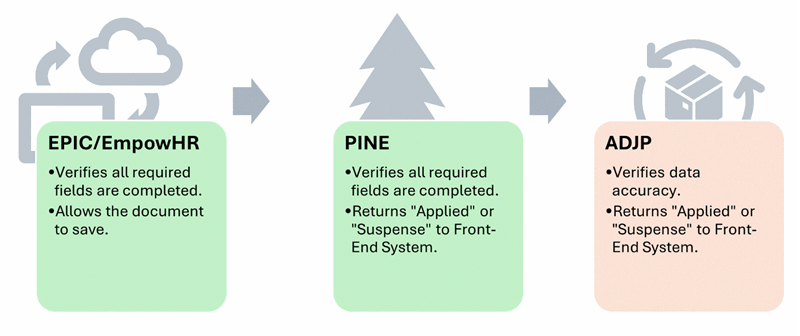
When all data is correct, the document applies to NFC PPS and ADJP and returns a status of Applied.
When the data is not correct, ADJP returns a status of Not Applied to PINE, and the document is placed into suspense in the front-end system with the appropriate error messages. This is important to note because the initial check by PINE ensured data is complete, and PINE returned a status of Applied to the human resources front-end system. Because ADJP failed the document, the status in the front-end system will change to Suspense. To ensure all lump-sum payments apply and are paid, Agencies must check the status of their lump-sum payment documents after two nightly PINE passes have completed.
Documents in Suspense
When ADJP discovers data inconsistencies it is important to note:
- The document in suspense will have a different User ID than the User ID on the document when it was entered. The User ID changes to NF000.
- The Agency must search for the documents in suspense by entering NF000 and by the individual's Social Security number or EmplID.
The document will remain in suspense until corrected in the front-end system. Once corrected, the process for validation will begin again. Timing is critical as the documents must show Applied before the Payroll Computation System (PAYE) runs to avoid the action being deleted by the end of pay period processes.
Timeline of the PINE/ADJP Validation Process:
Monday
- Document is entered.
- PINE checks the document during the Monday night pass and sends it to ADJP.
Tuesday
- ADJP checks the document during the Tuesday night pass of PINE.
Wednesday Morning
- If ADJP finds a data error, the document appears in Suspense.
Wednesday Afternoon
- Processor corrects the document and releases it.
Wednesday Night
- PINE checks the corrected document and sends it to ADJP.
Thursday Night
- ADJP checks the document during the Thursday night pass of PINE.
Friday Morning
- If no error is found, the document shows as Applied.
- If ADJP finds another error, the cycle restarts and the document will not apply until the following week.
Compensatory Time Off Lump-Sums Processed Manually
Compensatory time off payments are normally processed through EPIC Web, EmpowHR, or your Agency's FESI. However, there are some circumstances that will require Agencies to process the compensatory time payments via a manual payment process. These include:
-
If an employee earns compensatory time off hours at an overtime rate higher than the Title 5 rate.
- Example: Fair Labor Standards Act (FLSA) Nonexempt employees. NFC PPS records the hourly rate of overtime for compensatory time earned at the Title 5 rate. Therefore, when compensatory time off is earned at a higher FLSA overtime rate and that compensatory time is later liquidated, the compensatory time off payment must be processed manually.
-
If an employee does not have a rate or any hours in IRIS Program IR139.
- Example: Prior Year 2 balances do not include rates.
To process a compensatory time off manual payment for an FLSA-nonexempt employee, the Agency must:
- Submit a request in SPPS Web.
- Enter the compensatory time off hours to be paid.
- Enter the accounting data to be charged.
Note: Lump-sum compensatory time payments must be charged to the current fiscal year appropriation regardless of the fiscal year in which the compensatory time was earned.
- Enter the reason for manual payment (e.g., higher FLSA-overtime rate).
- Add a description of any debt to be collected in the SPPS Web Remarks field.
Agencies should access SPPS Web to check the status of a specific employee's payment or view payment details. After the lump sum is paid, Agencies should verify the compensatory hours are removed from IRIS Program IR139. If they have not been removed, Agencies must use TINQ to remove the hours from the PPS database.
FLSA Rules for Compensatory Time Payments.
Employees fall into two categories under FLSA for compensatory time payments; FLSA Exempt and FLSA Nonexempt. All employees, whether FLSA Exempt or FLSA Nonexempt, must use compensatory time earned by the end of the 26th pay period after the pay period during which it was earned.
FLSA-Exempt Employees
FLSA-exempt employees must use accrued compensatory time off by the end of the 26th pay period after the pay period during which it was earned. Based on Agency policy, an employee who either (1) fails to take earned compensatory time off within 26 pay periods, or (2) transfers to another Agency or separates from Federal service before the expiration of the 26-pay-period time limit expires, may be paid for unused compensatory time.
These employees can either:
Receive payment for the unused compensatory time off at the overtime rate in effect when earned.
OR
Forfeit the unused compensatory time off, unless failure to use the compensatory time off is due to an exigency of the service beyond the employee's control. The unused compensatory time off that would otherwise be forfeited due to an exigency of service is paid at the overtime rate in effect when earned.
FLSA Nonexempt Employees
FLSA-nonexempt employees must be paid for unused compensatory time earned at the overtime rate in effect when the time was earned if the time off is not used within 26 pay periods, or if the employee transfers to another Agency or separates from Federal service before the expiration of the 26-pay-period time limit.
Employees on Leave Without Pay (LWOP)
Both FLSA-exempt and nonexempt employees on LWOP must be paid for unused compensatory time earned if it is not used by the end of the 26th pay period after the pay period in which it was earned, provided they meet one of the criteria listed below.
- The employee is unable to use the compensatory time earned because of separation.
- The employee is unable to use the compensatory time earned because of placement in an LWOP status to perform service in the uniformed services.
- The employee is unable to use the compensatory time earned because of an on-the-job injury with entitlement to injury compensation under 5 U.S.C. Chapter 81.
Payment must be made at the overtime rate in effect at the time the overtime was earned.